Adding Value and Battling Staleness in Online Classes

Think back to some of the best courses you took during college. What made those courses so great for you? Well, other than the ones that were an easy A – what made them interesting to you over other courses? Probably one factor was an interesting instructor. Many instructors like to just read from the textbook or (even worse) a PowerPoint.  You know for a fact that their class is probably exactly the same this semester as it was last semester and the semester before that.

In other words: BORING!

The classes that most students end up liking are taught by instructors that are talking to them about current events and new information related to their subject. The course that you get this semester is slightly different than the one last semester. In other words – there is a a greater value in showing up to this course, because it will be interesting and relevant (and slightly different from what your roommate learned last semester). The instructor is reading and researching the subject and keeping you up to date on the course subject.

But… can this be done online… where classes are usually canned and solidified months before the first day of course?

Through the modern miracle of technology, the answer is yes – if you plan ahead.

You are probably teaching a course in a subject that you like. That means you are also probably reading blogs, articles, journals, and other websites related to that subject.  What if your students could follow you as you do all of this reading? What if they could research with you – and this research became the course content? What if they discussed what you read that week, instead of some canned, stale question you stuck in a “discussion board” months ago?

Technically, this is possible with a blog. But do you really want to log in and create an entire blog post for every article, blog post, etc, etc. that you find… several times a week? Sound too tiring to you? Well then I have two words for you:

Social Bookmarking

You have probably heard of sites like Delicious and Digg.  Did you know that you can use these sites as the content for your course? Ditch the pre-processed cheese html zip file, pdf, or (shudder) audio lecture recording and go flexible, relevant, and easy.

Here is one idea: create an account in Delicious. Then come up with a tag just for each class – edtc3320, for example.  Then install a Delicious bookmark plug-in for FireFox or Chrome (if you are using Internet Explorer, well… I am sorry).  You can then send your students to the page for your specific class tag, and they can use whatever RSS reader they want to follow you. You can even create multiple tags for different classes.

As you come across different articles and links that would apply to your class – bookmark them in delicious and tag them for the class you want to read them. Maybe even add a second link of ‘edtc3320week1’ or whatever to help students organize them better. Delicious lets you write short comments on each link – so let students know why you bookmarked the link. Then add a discussion question for each link. For your class discussion, tell students that they have to answer at least one question raised during each week’s readings.

But don’t ditch the blog just yet – you are the content expert, so you have great insights to add to everything you read, and delicious has a short limit on comments.  So blog about what you want, and then bookmark your blog post in Delicious. It gets added to the flow that students have to read each week.

Dynamic content, active learning, reflection, and rapid course design all in one neat package! Want to be really fancy? Get a RSS feed widget, and then insert that in to your LMS course for the students that don’t get RSS. They can just click on the content page and it will be there for them in the walled garden…errr… Learning Management System.

Want to see what this could look like? Well, as I find resources I like online, I have created a Delicious tag just for EduGeek Journal readers to follow:

http://delicious.com/grandeped/edugeekjournal

Follow me in your favorite RSS reader to see what this could be like.

{this post is being cross-posted at Soundings: Best Practices in Teaching and Technology]

The Future of Education: The ABCs vs. the EFGs

I’ve been pondering an article called “Future Ed: Remote learning, 3D screens” for a few days now.  While this article covers some interesting geeky stuff (such as ocular implants and 3-D screens), there are also some great nuggets of wisdom in there about how what we teach needs to change –   along with our technologies:

Barker pointed out that with more tech-savvy learning, the curriculum will have to change, too. He and his wife funded a five-year experiment in Chattanooga, Tenn., to create a 21st-century curriculum founded not just on learning the ABCs, but also the “EFGs”: Eco ed (“How do we interact with the planet?”), Futures ed (“How do I shape my future?”), and Global ed (“What is my relationship with other human beings?”).

Each student had to learn a 500-word vocabulary in six languages and, in sixth grade, choose one in which to be fluent, including cultural knowledge. Physical fitness focused on lifelong sports such as tennis and golf, not team activities. Grade levels were kindergarten “through competence” — that is, when students accomplished all of the program’s lofty goals, they graduated.

Personally, I get more excited about these approaches to changing education than others.  The “death to the university” concept is too much “baby and bathwater” to me, and the open education movement is too caught up in hopeless romanticism (or unhealthy bitterness) for my taste. I don’t think people in either one of these movements have really thought about what would happen if they got their way.

Think about it – you don’t want to drive across a bridge designed by someone that learned engineering through following an engineering blog do you? Or, for that matter, get operated on by a surgeon that learned surgery by watching a bunch of YouTube videos.  After Universities die and education goes free and open, people will begin to realize that we need to be able to prove that people learned what they needed to in order to do certain things. Then we will need to hire people to track who learned what, and those people will need a place to work and store records. We’ll go out and buy the empty college buildings, which will cost money, so we will start charging for education again. We’ll just end up right back where we started.

Or, we could listen to the people that want to reform what we have and end up in a better place overall in the end.

Anyways, the article I mentioned above covers a lot of ground in 4 pages, so give the whole thing a read with an open mind. Assessment, socialization, and realistic school reform (i.e. ideas for change that involve educators keeping their jobs) are all covered.

A Reality Check For Open Education

Finally… someone dared to speak out about some of the problems they have with open education.  And not just some old fuddy-duddy outsider that doesn’t get it, but an insider that is well versed in all angles.

I’m no fuddy-duddy open education hater myself… but I have felt a little discomfort over several aspects surrounding the open education movement.  One of the oddest to me has been the predictions that universities will disappear by the year 2000.  Opppsss… missed that one… I mean 2010 for sure.  Oh, wait… gonna have to make that 2020 now.  I wonder how long people have been predicting the death of the university now?  I remember those claims associated with closed circuit tele-courses many decades ago.

Finally, though, we have George Siemens breaking through the cute kitten syndrome barrier (as he calls it) on open education and raising some concerns that need to be addressed… not as a person that hates change for the sake of hating change, but as a person who likes the ideal but wonders if things aren’t going that well overall:

http://www.connectivism.ca/?p=151

One really disturbing aspect of the open education movement is the continued association with the fragmentation of the entertainment business (mp3s, Hulu, etc, etc).  I have no love for greedy music companies, but the fragmentation of that industry is seen by many as destroying it.  Less and less money is filtering to the artists, and most attempts to fix that have not worked.  Do we really want to change our educational systems to mirror a system that is choking the life out of the very people it needs to survive?  Sure, you will still have people making music even if there is no money in it, but you can only get so far on free services and volunteer work.  Trust me – I have tried.  Eventually, you have to have money flowing in to a system in order to keep the people in that system alive (at least as long as food costs money).  That flow of money will not happen with fragmentation on the level that we are seeing in the music business.

But that is how many have proposed we get rid of universities: make teaching volunteer work.  Really?  I would have to say “good luck on that one!”  How many classes can a full-time worker, parent, spouse, etc. handle in their spare time?  Many of you reading this are wondering what this spare time myth is.  One professor typically teaches something like 3-5 classes.  This would mean that someone out there (this faceless entity that will someone guide education once universities die) will need to grow the general pool of teachers by three to five fold to get all of these volunteers.  Did I miss the end of the teaching shortage some where?  Was there a memo I missed?

Of course, I know I am dealing with some of the more radical ideas out there.  But they always get brought into the mix when open education is discusses.  Don’t get me wrong – I think at its core, open education is a good idea.  I am just glad it is finally getting some close scrutiny.

To honor free comic day…

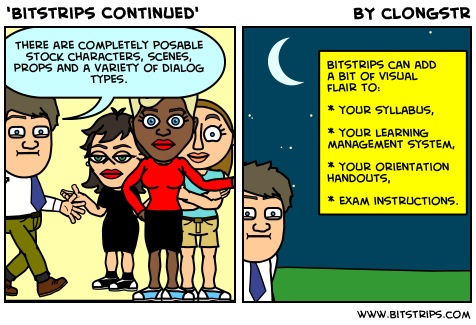
As many of the more geeky EduGeek readers know, last Saturday was Free Comic Book Day. I took advantage of this by catching up on Marvel’s fun and compelling Sinister Six (which was not free, by the way). This event has me thinking of a tool that I have used in the past which allows anyone to design, draft, and publish comic book strips. This is another entry on tools that instructors might use to appeal to visual learners: the tool I highlight this week is Bitstrips.

Bitstrips are an easy way to embed information visually to your students

Bitstrips are quick to make and they can convey information to your students visually without much effort. It is also a simple way to create a static avatar for your course.

Bitstrips can add a bit of visual  flair to:  your syllabus,  your learning  management system,  your orientation  handouts,  even exam instructions.

Bitstrips are not just for instructors, either. You could assign comic strip writing as creative exercises. A great thing about Bitstrip comics is that they can be edited by more than one person, if the designer desires. Therefore, students can work on creating a strip together. For example, a group could design a strip reflecting their interpretation of something that motivated a character to do what she or he did in a novel. Or perhaps they could draw up a case study graphically reflecting a prescribed course of actions.

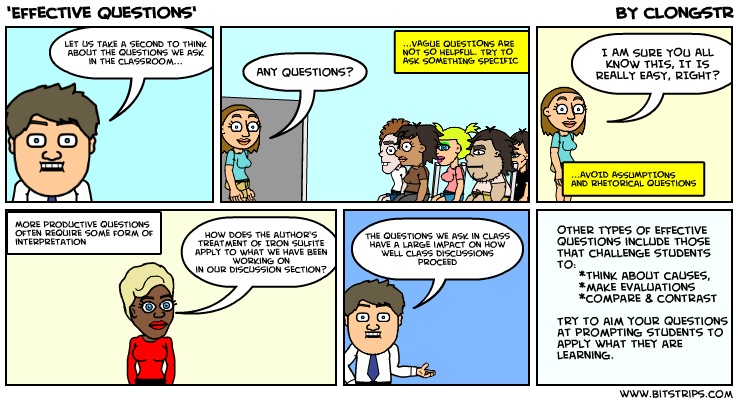
Example of a bitstrip giving advice on how to ask effective questions.

Bitstrips are easily transferable, both on-line and off. They can be embedded into websites, downloaded as a image file, e-mailed and/or printed. Clearly this flexibility makes Bitstrips quite open as an assessment opportunity.

So, with that being said, I would be really interested to know what uses for this you might have. Send me a note @clongstr on Twitter and I will gather them to post later.

Introducing Cool Iris

When we want to move our student’s learning environment into the ether of the web, we can be hard pressed to go beyond simply assigning more reading.  In the days of multimedia, interactivity and all things web 2.0, assigning links to on-line articles will not cause many students to leap up for their netbooks with joy and glee.  There are a couple of web-based tools that I would like to posit as potentially very useful when we want to appeal to our students who learn best visually and experientially.  This week, I would like us to take a look at Cool Iris.

cooliris2

Click this link for a Cool Iris Demonstration
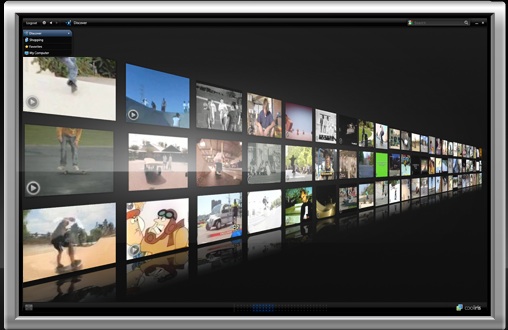
A brief summary of Cool Iris; it is a free(!) browser plug-in for MS Internet Explorer, Firefox, Safari, and Flock (that’s right, dear reader, Flock).  The browser add-on throws open a 3D wall that lets users rapidly browse hundreds of images instantly, using image results from search engine sites.  Default search engines include Google, Yahoo!, Flickr, Photobucket, YouTube, and even Hulu.   “Hulu?” I hear you ask. Weirdly enough, it was surprisingly enlightening to do a quick search on ‘autism’ in Hulu to see what Hollywood threw back at me. Plenty of learning opportunities there, my friends…

But wait, folks, there’s more.  Cool Iris is not limited to the default search engines.  It is enabled on a variety of other websites such as Getty Images, Facebook, the LA Times and many others.  Beyond being a very fast method for gathering and viewing a large collection of photos and videos, users are also able to collect images into a “Favorites” basket – useful for later recollection and/or presentations.  Moreover, Cool Iris allows users to send images they find to others.

How might one use Cool Iris in a blended environment?  When I first presented this tool in-class, I had students do a search in the Flickr search engine within Cool Iris using the three terms ‘Chinese, Buddhist, temple.’  chinesetemple When their 3-D wall popped up, I asked them to scan the photos for about 5 minutes asking them to take stock of what they saw – colors, features, architecture, statues, whatever they thought was striking. We then had a quick discussion and in about 10 minutes time, my crew had a pretty strong grasp of many of the common features of Chinese Buddhist religious architecture.

For homework, I then assigned my students to go home and using their web browsers do a similar exercise using the terms ‘Japanese, Buddhist, temple.’   In this assignment, they were required to take notes that took stock of features they saw in Japanese Buddhist tempes as well as make comparisons with the Chinese temples.

japanesetemple The next time we met, my students were very proficient at distinguishing Japanese and Chinese Buddhist temples from one another. They noted that the Japanese temples tended to be more integrated into their surroundings, that the colors were more neutral and that the exteriors tended to be less ornate than their Chinese counterparts.  This allowed me to then talk about the predominance of Zen Buddhism in Japan as well as the influence of Shinto religion on Japanese expressions of Buddhism.

The sheer ease of this tool has plenty of potential for an all on-line classroom environment.  Give it a try, I bet you will agree.

Why Some Web2.0 Tools Fail in Education

Many people have had great success integrating various Web2.0 tools and sites into their online classes.  Still others try very hard but come away frustrated with the results.  Is Web2.0 just a random concept that gives some instructors success while confusing others with no discern-able pattern?  Or is there a reason why some well-planned activities using Web2.0 still fail?

Many people point at bad pedagogy as the reason for some failures, only to end up finding out that good pedagogy can still lead to dissatisfied students.  Sure, there are those instructors that just get caught up in the ghee-whiz factors of some “cool tool” they just discovered.  They ignore pedagogy at their own peril, and then scratch their head when their cool tool fails to impact students.

But why do some Web2.0 activities with solid pedagogy still flop?  I believe it is because the instructional designers ignore three important foundations of what makes Web2.0 so powerful:

  1. Social Networking. Call it socialization.  Call it constructivism, or connectivism.  Or pop-educational mumbo jumbo.  But the factor that makes Web2.0 sites like Facebook so popular is that they help people connect with each other and interact in interesting ways.  Sure, you might come up with a really solid pedagogical way to use blogs in an online course.  Students get out there and do an awesome job journaling their thought processes as they work on class projects. But once the students get out there and create their own blog, those blogs are still independent of each other, with no real networking going on (beyond the two required comments students have to post each week).  Or you are using Twitter to just broadcast class updates, with no real socialization happening?  Students will get bored quickly.  What ever tool you use, you need to utilize the social nature of that tool and get students interacting.
  2. Relevant, useful information. You’ve heard the complaints about Twitter many times: “I could care less how many times everyone brushes their teeth each day, so why should I bother with this micro-blogging thing?”  Even when people interact socially, if the interaction is asynchronous to some degree, they still need to interact over information that they find useful and relevant to their life or situation.   Especially in educational situations.  Even if you are helping students get to know each other better, they still need to do that over interesting facts about each other.   Many educational activities using Web2.0 tools can have solid pedagogical reasoning and brisk interaction/ socialization, but still end up failing because they are still used to communicate information that is not relevant or useful or maybe that is even covered in other areas (such as the textbook).
  3. Constructing information. Even once the information becomes relevant and useful, the students may end up doing nothing with it.  The talking head at the front of the classroom has been transferred into a “talking head” on a blog or a podcast.  The students don’t do any useful higher order thinking with the information they receive… it all just becomes trivia to tuck away until the test.  Today’s learners, no matter their age, are becoming producers of information – not just consumers.  Don’t just have them interact over relevant information in a pedagogically sound activity – have them do something with that information.  Have them construct and connect that information into something meaningful.

Microlectures: A Constructivist’s Dream Come True

Here’s another emerging trend for you: Microlectures.  The Chronicle of Higher Education has an interesting article on microlectures called “These Lectures Are Gone in 60 Seconds.”  Basically, one would create a microlecture in this fashion:

Take a 60-minute lecture. Cut the excess verbiage, do away with most of the details, and pare it down to key concepts and themes.

What always makes me laugh about these articles is that some expert always comes in at some point and enlightens us about the short comings of some trend.  Trends are not perfect?  Really?  I think the pedagogical limitations of a microlecture are obvious.  They are obviously not great for more complex subjects that need detailed explanations (but where you need a more detailed explanation of complex subject… why not still chunk that complex subject into smaller steps…  you know, to help people grasp them easier?).

The important thing is that by considering a microlecture, some instructors might actually see the bad pedagogy they have been using all along.  Because while it is true that some concepts are too complex for a microlecture, I would be willing to bet that there at least a thousand percent or more concepts that are not complex enough for a full lecture and get that treatment anyways.  I’m also an instructor from time to time, and let’s face it – we tend to have a habit of loving the sound of our own voice.

The article link above is also a great resource in that (at the end) it teaches how to create a microlecture.  The important thing to note is that a microlecture can be more than 60 seconds.  Also note point number 4 on the list  – this step is very important in helping students actively construct the knowledge they need.  The important part to remember is that the microlecture does not communicate everything the students need to learn… they still have to construct that later on their own.

Shame On Those Pesky, Distracting Laptops

“Recent studies suggest that laptops in class detract from lecture-based learning”

Lecture-based learning?  Isn’t that an oxymoron?  How much can you really learn by sitting and soaking?  :)

Okay, so I’m showing my constructivism bias here.  The article I am reading, Can I have your half-attention, please?, actually is an interesting read about how instructors are getting over their technophobia (and themselves in the process) and finding ways to integrate laptops into learning.  It also shows how other instructors misunderstood what is going on in their class before laptops.  I was one of those students that zoned out and started doodling on my notes to pass time until lecture was over.  If I had a laptop, I bet I would have paid more attention, because I could have double checked the instructor’s facts while he/she was talking.

Educators like Don Krug and Richard Smith are really getting the idea about laptops (even though they both seem to come at the issue from two different angles), while others like Jean Boivin are just missing it.  Too bad the ones that miss it have some questionable research to back them up.  I hope we get some better designed research studies on this in the future.

What You Need to Know About Excellence in Web-Based Teaching

The Canadian Journal of Learning and Technology published an excellent article at the end of last year titled “An absolutely riveting online course: Nine principles for excellence in web-based teaching.”  My short time as an instructional designer has taught me that all of these principles are true.  Also of interest is how this article includes many research citations that support connectivism, social networking, and active learning.

I think I like the second paragraph of the conclusion better as a summary than the abstract:

It is not sufficient to be a content expert. Nor is it sufficient to be “tech-savvy”. It is not even sufficient to be an excellent traditional classroom teacher. Because the online world is a categorically different environment a particular blend of skills and knowledge is necessary if success is to be found in this domain.

This article a great way to introduce research-based facts for training on how to have a better online class.  I would show this article to anyone involved in the process, not just the instructional designer.

M.I.T.’s Technology Enhanced Active Learning

M.I.T. has been debating whether they should ditch the traditional lecture format of introductory physics and go with something better for a while.  Seems like the debate is over: “The physics department has replaced the traditional large introductory lecture with smaller classes that emphasize hands-on, interactive, collaborative learning.”  The result?  Attendance is up and the failure rate is down nearly 50 percent.  The New York Times has an article with more details about the project.

Online educators have championed this kind of learning for… ummmm… ever?  Even though some subjects like physics might not be able to easily make the transition to an online environment, most courses that go online do so with the goal of being hands-on, interactive, and collaborative.

The New York Times article also points out some other interesting facts.  For example, no matter how interesting an instructor is, students still lose interest in long lectures.  I would bet that you could find the same is said about online lecture videos, pod casts, or lecture-based video conference sessions.  I know I don’t find those very engaging for very long.

Another fact that teachers really need to pay attention to is that the human brain has been found to only be able to hold a maximum of maybe seven different items in its short-term memory, and that it can not process more than four ideas at once.  So – watch what all you cram in to those lessons – online or face-to-face.

Although none of this really promotes online education specifically, good distance courses are usually designed the way these M.I.T. courses are.  And, overall, this is a plus for technology in learning in general.